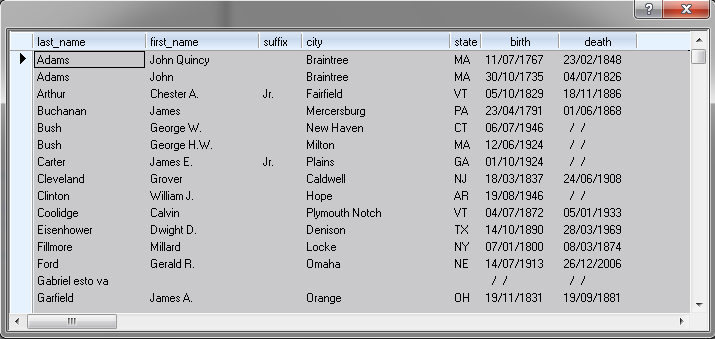
Creamos el procedimiento almacenado desde el cliente mysql de nuestra preferencia
DELIMITER $
DROP PROCEDURE IF EXISTS born_in_year;
CREATE PROCEDURE born_in_year( year_of_birth INT )
BEGIN
SELECT first_name, last_name, birth, death from president where year( birth ) = year_of_birth;
END $
DELIMITER ;
para ejecutarlo simplemento lo hacenmos pro medio de un query
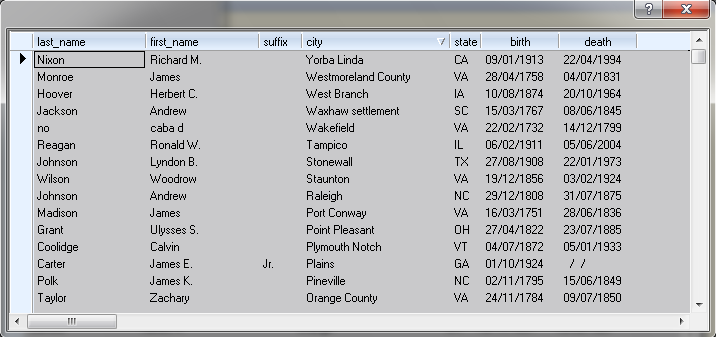
cText = "CALL born_in_year( 1908 )"
oQry := oServer:Query( cText )
el siguiente llamdo es importante para "terminar" el proceso
oServer:NextResult()
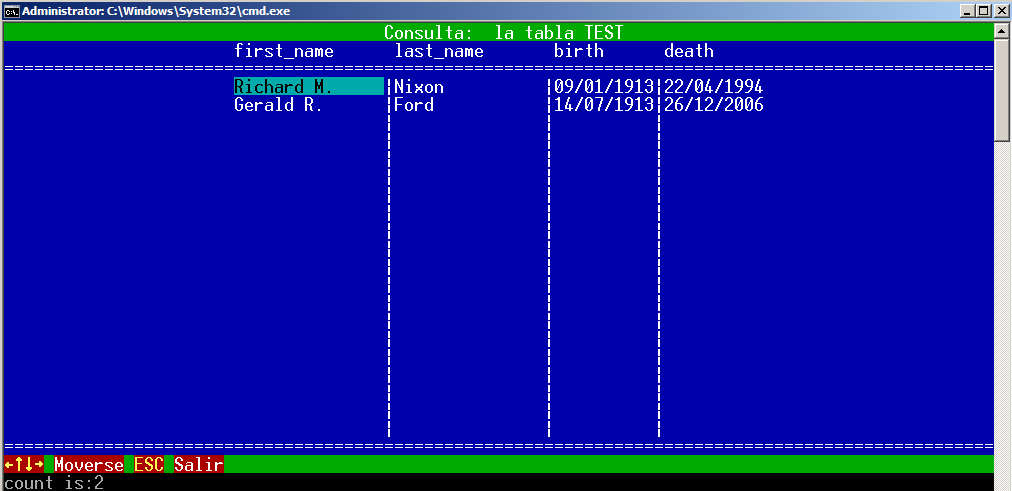
veammos el ejemplo completo
#include "tdolphin.ch"
#define CRLF Chr( 13 ) + Chr( 10 )
PROCEDURE Main()
LOCAL cText := ""
LOCAL oQry, oServer
SET CENTURY ON
SET DATE FORMAT "dd/mm/yyyy"
D_SetCaseSensitive( .T. )
IF ( oServer := ConnectTo() ) == NIL
RETURN NIL
ENDIF
cls
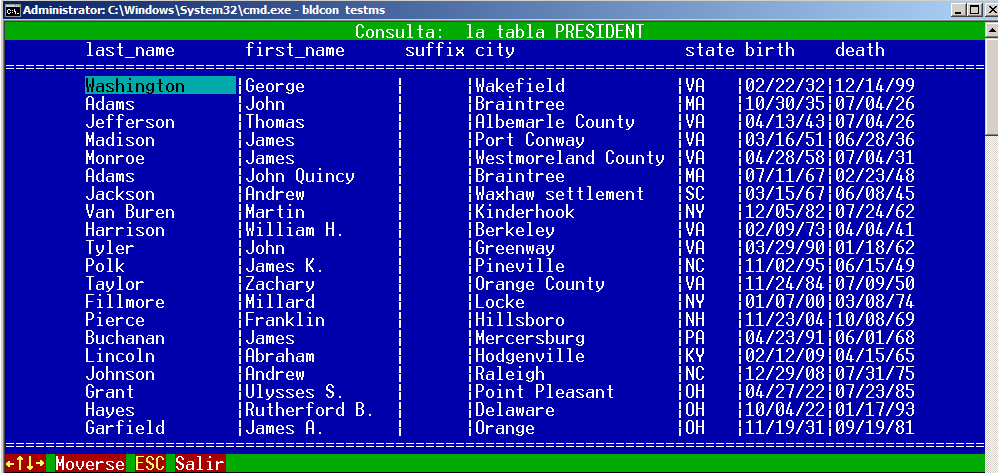
cText = "CALL born_in_year( 1908 )"
oQry := oServer:Query( cText )
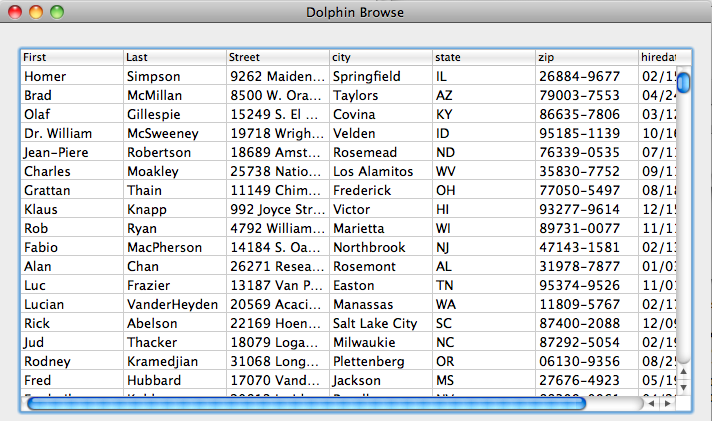
DolphinBrw( oQry, "Test" )
oServer:NextResult()
oQry:End()
cText = "CALL born_in_year( 1913 )"
oQry := oServer:Query( cText )
DolphinBrw( oQry, "Test" )
oServer:NextResult()
oQry:End()
cText = "call count_born_in_year( 1913, @count )"
oQry := oServer:Execute( cText )
oServer:NextResult()
oQry := oServer:Query( "select @count as count" )
? "count is:"
?? oQry:count
oQry:End()
RETURN
esto verifica que no exista otro query con resultado (por motivos de posibles multiples sentencias en los precedimeintos) y cierra el ciclo de existir otro query con resultado deberiamos hacer lo siguiente
oQry:LoadNextQuery( )
asi cargamnos automaticamente el proximo resultado de un query para multi sentencias
ejemplo de multiples sentencias
#include "tdolphin.ch"
FUNCTION Main()
LOCAL oServer, oQry
D_SetCaseSensitive( .T. )
Set_MyLang( "esp" )
IF ( oServer := ConnectTo() ) == NIL
RETURN NIL
ENDIF
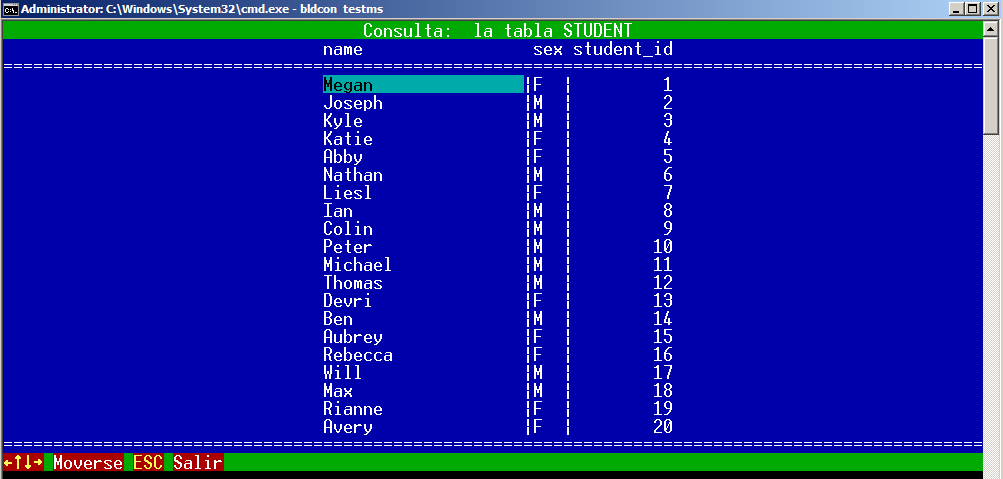
oQry = oServer:Query( "select * from president; select * from student" )
DolphinBrw( oQry, "President" )
oQry:LoadNextQuery( )
DolphinBrw( oQry, "Student" )
oQry = NIL
oServer:End()
RETURN NIL
#include "connto.prg"
#include "brw.prg"
Mostrando entradas con la etiqueta samples. Mostrar todas las entradas
lunes, 2 de mayo de 2011
jueves, 23 de septiembre de 2010
Servidor incrustado / Embedded Server
Actualizado SVN para el uso de servidor incrustado
Updated SVN for embedded server
se agregaron a la carpeta sample los archivos necesarios
los nuevos script para ejecutar los ejemplos con el servidor incrustado son los terminados en "_e" ejemplo bldhm_e.bat, construye el ejemplo para el servidor inscrustado usando el compilador de microsoft
(por los momentos todos en modo consola)
added to samples folder the files necessaries to run embedded server
the new script to build embedded samples are all finished with "_e", ie. bldhm_e.bat, build the embedded server sample with microsoft compiler
(for now all are in console mode)
download samples here
Updated SVN for embedded server
se agregaron a la carpeta sample los archivos necesarios
los nuevos script para ejecutar los ejemplos con el servidor incrustado son los terminados en "_e" ejemplo bldhm_e.bat, construye el ejemplo para el servidor inscrustado usando el compilador de microsoft
(por los momentos todos en modo consola)
added to samples folder the files necessaries to run embedded server
the new script to build embedded samples are all finished with "_e", ie. bldhm_e.bat, build the embedded server sample with microsoft compiler
(for now all are in console mode)
download samples here
jueves, 26 de agosto de 2010
Actuazalicion / Update
Esta funcionando exportar a SQL SCRIPT
Export to SQL SCRIPT is working
oExp = oQry:Export( EXP_SQL, "client.sql" )
Download Here
Export to SQL SCRIPT is working
oExp = oQry:Export( EXP_SQL, "client.sql" )
Download Here
jueves, 19 de agosto de 2010
Actuazalicion / Update
Esta funcionando exportar a WORD,
Export to WORD is working
oExp = oQry:Export( EXP_WORD, CurDrive() + ":\" + CurDir() + "\client", , { "@!", "@!" } )
martes, 10 de agosto de 2010
Actuazalicion / Update
Esta funcionando exportar a HTM/HTML, se debe asignar el nombre del archivo con la extencion valida (htm/html)
Export to HTM/HTML is working, we should write filename with valid extention (htm/html)
Download Here
www.sitasoft.net/dolphin/files/client.html
Export to HTM/HTML is working, we should write filename with valid extention (htm/html)
Download Here
www.sitasoft.net/dolphin/files/client.html
lunes, 9 de agosto de 2010
Actualizacion/Update
Finalizado elproceso de exportacion a DBF, podemos seleccionas los campos a exportar
Finished export to DBF, we can select field to export
el ejemplo a constinuacion consta de 10.000 registros
the next sample is 10.000 record
Download Here
oQry = oServer:Query( "SELECT * FROM clientes" )
oExp = oQry:Export( EXP_DBF, "client.dbf" )
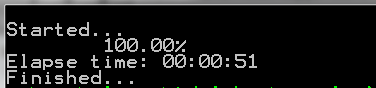
oExp:bOnStart = { || QOut( "Started..."), QOut( ""), cTime := Time() }
oExp:bOnRow = {| o, n | ShowLine( n, oQry:LastRec() ) }
oExp:bOnEnd = { || QOut( "Elapse time: " + ElapTime( cTime, Time() ) ), QOut( "Finished...") }
Finished export to DBF, we can select field to export
el ejemplo a constinuacion consta de 10.000 registros
the next sample is 10.000 record
Download Here
oQry = oServer:Query( "SELECT * FROM clientes" )
oExp = oQry:Export( EXP_DBF, "client.dbf" )
oExp:bOnStart = { || QOut( "Started..."), QOut( ""), cTime := Time() }
oExp:bOnRow = {| o, n | ShowLine( n, oQry:LastRec() ) }
oExp:bOnEnd = { || QOut( "Elapse time: " + ElapTime( cTime, Time() ) ), QOut( "Finished...") }
lunes, 2 de agosto de 2010
Actuazalicion / Update
Se inio el proceso de exportacion de Consultas a otros formatos, por ahora estan listo TEXTOS y EXCEL, la idea es exportar a HTML, WORD, SQL SCRIPT, XML y por supuesto DBF
Se pueden personalizar encabezados y finales de archivo y manipular linea a linea creada
Started queries export process to other format, for now is working TEXT and EXCEL, the idea is export to HTML, WORD, SQL SCRIPT, XML and off course DBF
We can customize Headers and Footers and handle row by row
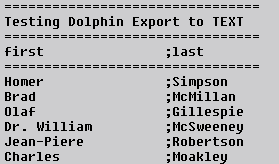
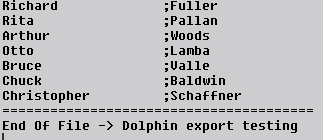
Samples to TEXT
Download here
oQry = oServer:Query( "SELECT first, last FROM clientes limit 100" )
oExp = oQry:Export( EXP_TEXT, "client.txt" )
oExp:bOnStart = {| o | FWrite( o:hFile, Replicate( "=", Len( cHead ) ) + CRLF, Len( cHead ) + 1 ),;
FWrite( o:hFile, cHead, Len( cHead ) ),;
FWrite( o:hFile, Replicate( "=", Len( cHead ) ) + CRLF , Len( cHead ) + 1 ) }
oExp:bOnRow = {| o, n, cText| ShowLine( o, n, cText, oQry:LastRec() ) }
oExp:bOnEnd = {| o | FWrite( o:hFile, Replicate( "=", Len( cEnd ) ) + CRLF, Len( cEnd ) + 1 ),;
FWrite( o:hFile, cEnd, Len( cEnd ) ) }
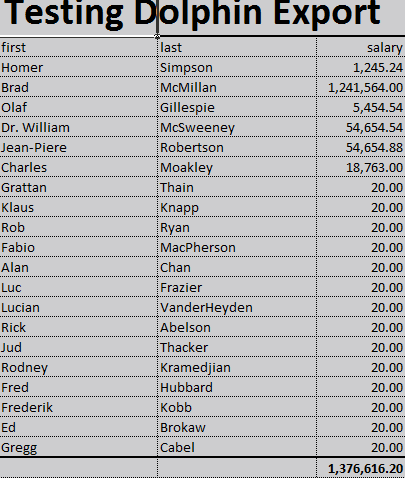
Export to Excel
Download Here
oQry = oServer:Query( "SELECT first, last, salary FROM clientes limit 20" )
oExp = oQry:Export( EXP_EXCEL, CurDrive() + ":\" + CurDir() + "\client", , { , , "999,999.99" } )
oExp:lMakeTotals = .T.
oExp:bOnStart = {| o | Header( o ) }
oExp:bOnRow = {| n, cText| ShowLine( n, cText, oQry:LastRec() ) }
Se pueden personalizar encabezados y finales de archivo y manipular linea a linea creada
Started queries export process to other format, for now is working TEXT and EXCEL, the idea is export to HTML, WORD, SQL SCRIPT, XML and off course DBF
We can customize Headers and Footers and handle row by row
Samples to TEXT
Download here
oQry = oServer:Query( "SELECT first, last FROM clientes limit 100" )
oExp = oQry:Export( EXP_TEXT, "client.txt" )
oExp:bOnStart = {| o | FWrite( o:hFile, Replicate( "=", Len( cHead ) ) + CRLF, Len( cHead ) + 1 ),;
FWrite( o:hFile, cHead, Len( cHead ) ),;
FWrite( o:hFile, Replicate( "=", Len( cHead ) ) + CRLF , Len( cHead ) + 1 ) }
oExp:bOnRow = {| o, n, cText| ShowLine( o, n, cText, oQry:LastRec() ) }
oExp:bOnEnd = {| o | FWrite( o:hFile, Replicate( "=", Len( cEnd ) ) + CRLF, Len( cEnd ) + 1 ),;
FWrite( o:hFile, cEnd, Len( cEnd ) ) }
Export to Excel
Download Here
oQry = oServer:Query( "SELECT first, last, salary FROM clientes limit 20" )
oExp = oQry:Export( EXP_EXCEL, CurDrive() + ":\" + CurDir() + "\client", , { , , "999,999.99" } )
oExp:lMakeTotals = .T.
oExp:bOnStart = {| o | Header( o ) }
oExp:bOnRow = {| n, cText| ShowLine( n, cText, oQry:LastRec() ) }
sábado, 31 de julio de 2010
Actuazalicion / Update
> tdolpqry.PRG
> function.c
Nuevas funnciones y metodos para localizar registros en una consulta
> function.c
Nuevas funnciones y metodos para localizar registros en una consulta
New functions and Method to locate record
METHOD Find( aValues, aFields, nStart, nEnd, lRefresh )
aValues = Array de datas a buscar / data array to seek
aField = Array de campos que filtrara la busqueda / Field array to filter seek
nStart = Registro comienzo para buscar / start record to seek
nEnd = Registro final a bsucar / end record to seek
Este metodo no tiene ninguna restriccion, buscara de forma secuencial dentro de la consulta activa, devolvera el primer registro que satisfaga la condicion de busqueda
this method dont have any restriction, will seek sequentally inside active query, return the first record that, will return the first record that satisfies the search condition
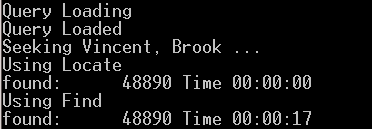
METHOD Locate( aValues, aFields, nStart, nEnd, lRefresh )
igual al metodo Find, la diferencia es, este metodo es mas rapido y para obtener los resultados deseados, debera estar la consulta ordenada de igual forma a los campos a buscar
ejemplo.
si desea buscar por field1, field2 y field3 la consulta debera estar ordenada ORDER BY field1, field2, field3
same Method Find, the difference is: this method is more fast, to get better result, the query should be order same to field seek
ie.
if you want seek field1, field2 and field3 the query should be order like ORDER BY field1, field2, field3
sample:
oQry = oServer:Query( "SELECT * FROM clientes ORDER BY first, last " )
oQry:Find( { "Vincent", "Brook" }, {"first", "last" } )
oQry:Locate( { "Vincent", "Brook" }, {"first", "last" } )
viernes, 30 de julio de 2010
Rapido!!!! / Fast!!!!
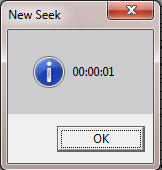
He realizado una nueva funcion SEEK para busquedas que IMPRESINANTEMENTE RAPIDA
I did a new function SEEK to seek, is INCREDIBLE FAST
el ejemplo consta de 50.000 resgistros y el resultado buscando la "Z" con la rutina actual fue:
the sample is 50.000 record and result seeking "Z", with current seek method was:
Download Test (new method)
Nuevo metodo Seek
New Seek Method
I did a new function SEEK to seek, is INCREDIBLE FAST
el ejemplo consta de 50.000 resgistros y el resultado buscando la "Z" con la rutina actual fue:
the sample is 50.000 record and result seeking "Z", with current seek method was:
Download Test (new method)
Nuevo metodo Seek
New Seek Method
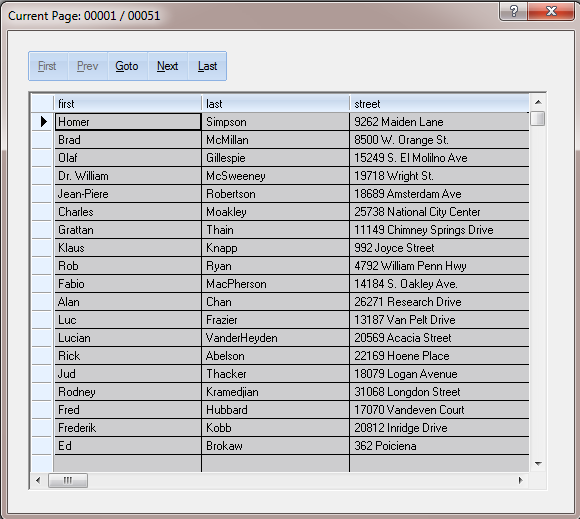
Paginacion / Pagination
Dolphin maneja la paginacion automaticamente, explicare las datas y metodo que usa
Dolphin manage automatically pagination, i will explain what datas and method used
DATAS
nCurrentPage Pagina activa / Current page
nTotalRows Total filas en la consulta / Total row without limits
nPageStep Total filas por pagina / total rows for page
nMaxPages Cantidad maxima de paginas en la consulta / Max pages avalaible in query
nCurrentLimit Limite activop / Current limit value
bOnChangePage Code Block que se evealua cada vez que se cambia una pagina / codeblock to evaluate when change page
METHOD
SetPages( nLimit ) Activa la paginacion y configura la cantidad de lineas por paginas nLimit, Activate pagination and Set total rows by page nLimit
NextPage( nSkip ) Va a la siguiente pagina disponible o avanza nSkip paginas / Go to next page avalaible or skip nSkip pages
PrevPage( nSkip ) Va a la pagina anterior disponible o retrocede nSkip paginas / Go to previous page avalaible or back nSkip pages
El ejemplo esta construido con la version 10.7 de fivewin / This samples was built with fivewin version 10.7
oQry:SetPages( 100 )
oQry:bOnChangePage = { || oBrw:Refresh(), ChangeTitle( oQry, oDlg ) }
//Button Actions
@ 10, 10 RBBTN aBtns[ 1 ] PROMPT "&First" OF oDlg SIZE 20, 15 ;
GROUPBUTTON FIRST CENTER ;
ROUND ROUNDSIZE 2;
ACTION( oQry:FirstPage() ) ;
WHEN( oQry:nCurrentPage > 1 )
@ 10, 30 RBBTN aBtns[ 2 ] PROMPT "&Prev" OF oDlg SIZE 20, 15 ;
GROUPBUTTON CENTER ;
ROUND ROUNDSIZE 2;
ACTION( oQry:PrevPage() ) ;
WHEN( oQry:nCurrentPage > 1 )
@ 10, 50 RBBTN aBtns[ 3 ] PROMPT "&Goto" OF oDlg SIZE 20, 15 ;
GROUPBUTTON CENTER ;
ROUND ROUNDSIZE 2;
ACTION( nPage := oQry:nCurrentPage,;
MsgGet( "Select Page:", "Page", @nPage ),;
oQry:GoToPage( nPage ) )
@ 10, 70 RBBTN aBtns[ 4 ] PROMPT "&Next" OF oDlg SIZE 20, 15 ;
GROUPBUTTON CENTER ;
ROUND ROUNDSIZE 2;
ACTION( oQry:NextPage() ) ;
WHEN( oQry:nCurrentPage < oQry:nMaxPages )
@ 10, 90 RBBTN aBtns[ 5 ] PROMPT "&Last" OF oDlg SIZE 20, 15 ;
GROUPBUTTON END CENTER ;
ROUND ROUNDSIZE 2;
ACTION( oQry:LastPage() ) ;
WHEN( oQry:nCurrentPage < oQry:nMaxPages )
Dolphin manage automatically pagination, i will explain what datas and method used
DATAS
nCurrentPage Pagina activa / Current page
nTotalRows Total filas en la consulta / Total row without limits
nPageStep Total filas por pagina / total rows for page
nMaxPages Cantidad maxima de paginas en la consulta / Max pages avalaible in query
nCurrentLimit Limite activop / Current limit value
bOnChangePage Code Block que se evealua cada vez que se cambia una pagina / codeblock to evaluate when change page
METHOD
SetPages( nLimit ) Activa la paginacion y configura la cantidad de lineas por paginas nLimit, Activate pagination and Set total rows by page nLimit
NextPage( nSkip ) Va a la siguiente pagina disponible o avanza nSkip paginas / Go to next page avalaible or skip nSkip pages
PrevPage( nSkip ) Va a la pagina anterior disponible o retrocede nSkip paginas / Go to previous page avalaible or back nSkip pages
FirstPage() Va a la primera pagina / Go to first page
LastPage() Va a la ultima pagina / Go to last page
GotoPage( nPage ) Va a la pagina espcifica por nPage / Go to specific nPage Page
El ejemplo esta construido con la version 10.7 de fivewin / This samples was built with fivewin version 10.7
Ejemplo / Sample
oQry:SetPages( 100 )
oQry:bOnChangePage = { || oBrw:Refresh(), ChangeTitle( oQry, oDlg ) }
//Button Actions
@ 10, 10 RBBTN aBtns[ 1 ] PROMPT "&First" OF oDlg SIZE 20, 15 ;
GROUPBUTTON FIRST CENTER ;
ROUND ROUNDSIZE 2;
ACTION( oQry:FirstPage() ) ;
WHEN( oQry:nCurrentPage > 1 )
@ 10, 30 RBBTN aBtns[ 2 ] PROMPT "&Prev" OF oDlg SIZE 20, 15 ;
GROUPBUTTON CENTER ;
ROUND ROUNDSIZE 2;
ACTION( oQry:PrevPage() ) ;
WHEN( oQry:nCurrentPage > 1 )
@ 10, 50 RBBTN aBtns[ 3 ] PROMPT "&Goto" OF oDlg SIZE 20, 15 ;
GROUPBUTTON CENTER ;
ROUND ROUNDSIZE 2;
ACTION( nPage := oQry:nCurrentPage,;
MsgGet( "Select Page:", "Page", @nPage ),;
oQry:GoToPage( nPage ) )
@ 10, 70 RBBTN aBtns[ 4 ] PROMPT "&Next" OF oDlg SIZE 20, 15 ;
GROUPBUTTON CENTER ;
ROUND ROUNDSIZE 2;
ACTION( oQry:NextPage() ) ;
WHEN( oQry:nCurrentPage < oQry:nMaxPages )
@ 10, 90 RBBTN aBtns[ 5 ] PROMPT "&Last" OF oDlg SIZE 20, 15 ;
GROUPBUTTON END CENTER ;
ROUND ROUNDSIZE 2;
ACTION( oQry:LastPage() ) ;
WHEN( oQry:nCurrentPage < oQry:nMaxPages )
martes, 27 de julio de 2010
TDolphin in OSX
TDolphin ahora en Mac (osx), explicare como generar las libreria de MySql y las libreria de Dolphin
TDolphin now in Mac( osx), i will explain how build MySql Lib and Dolphin libs
Herramientas/ Tools
Descargar cMake / Download cMake
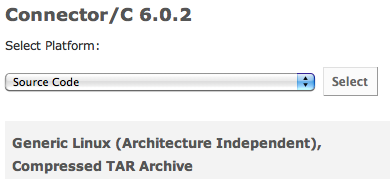
Mysql
Descargar fuentes de MySql / Download Mysql Source Code
Dolphin
Descargar dolphin desde el SVN / Download Dolphin from SVN
www.sitasoft.net/dolphinosx
Descargar Directa Dolphin / Direct Download Dolphin
Esta incluida la libreria dolphin y Mysql, harbour / Include Dolphin and MySql Lib, harbour
estan construidas en Snow Leopard / built in Snow Leopard
Installing...
1- Instalar CMake / Install CMake
2- Descomprimir Codigo fuente de MySql / UnZip MySql Source Code
A la carpeta descomprimida (ej. mysql-connector-c-6.0.2), personalmente, le cambio el nombre para ser mas facil accesarla desde el terminal (ej. connector) / The unzip folder (ie. mysql-connector-c-6.0.2), personally, i change the folder name to easy access from terminal (ie. connector)
3- Abrir el Terminal e ir a la carpeta descomprimida de MySql / Open Terminal and go to MySql unzip folder
4- cmake -G "Unix Makefiles"
5- make
6- Descomprimir archivo de dolphin (Descarga Directa) / Unzip dolphin file (Direct Download)
7- desde el terminal ir a la carpeta descomprimida de Dolphin / from terminal go to dolphin unzip folder
8- make
para constuir los ejemplos con fivemac, deberan cambiar los path dentro de buildfw.sh (si fuese necesario) / Build fivemac samples, should change path inside buildfw.sh (if is necessary)
TDolphin now in Mac( osx), i will explain how build MySql Lib and Dolphin libs
Herramientas/ Tools
Descargar cMake / Download cMake
Mysql
Descargar fuentes de MySql / Download Mysql Source Code
Dolphin
Descargar dolphin desde el SVN / Download Dolphin from SVN
www.sitasoft.net/dolphinosx
Descargar Directa Dolphin / Direct Download Dolphin
Esta incluida la libreria dolphin y Mysql, harbour / Include Dolphin and MySql Lib, harbour
estan construidas en Snow Leopard / built in Snow Leopard
Installing...
1- Instalar CMake / Install CMake
2- Descomprimir Codigo fuente de MySql / UnZip MySql Source Code
A la carpeta descomprimida (ej. mysql-connector-c-6.0.2), personalmente, le cambio el nombre para ser mas facil accesarla desde el terminal (ej. connector) / The unzip folder (ie. mysql-connector-c-6.0.2), personally, i change the folder name to easy access from terminal (ie. connector)
3- Abrir el Terminal e ir a la carpeta descomprimida de MySql / Open Terminal and go to MySql unzip folder
4- cmake -G "Unix Makefiles"
5- make
6- Descomprimir archivo de dolphin (Descarga Directa) / Unzip dolphin file (Direct Download)
7- desde el terminal ir a la carpeta descomprimida de Dolphin / from terminal go to dolphin unzip folder
8- make
para constuir los ejemplos con fivemac, deberan cambiar los path dentro de buildfw.sh (si fuese necesario) / Build fivemac samples, should change path inside buildfw.sh (if is necessary)
viernes, 23 de julio de 2010
Debido al comentario de Charly hice un ajuste al ejemplo TestFile
For Charly comment, i did a little adjust to samples TestFile
"Charly dijo...
Daniel,
A medida que vas añadiendo ficheros, el sistema se vuelve mas lento al hacer el browse(). Seguramente en la lectura te bajas tambien el contenido del blob..."
"Charly said ...
Daniel,
As you add files, the system becomes slower to make the browse (). Probably you're reading the contents of the blob ... "
Gracias Charly por el feedback
Thank Charly by Feedback
For Charly comment, i did a little adjust to samples TestFile
"Charly dijo...
Daniel,
A medida que vas añadiendo ficheros, el sistema se vuelve mas lento al hacer el browse(). Seguramente en la lectura te bajas tambien el contenido del blob..."
"Charly said ...
Daniel,
As you add files, the system becomes slower to make the browse (). Probably you're reading the contents of the blob ... "
Gracias Charly por el feedback
Thank Charly by Feedback
jueves, 22 de julio de 2010
Guardando Archivos/Save File
Es necesario actualizar desde el SVN, se hizo un pequeño cambio para construir el ejemplo
Is necessary download from SVN, i did a littlel change to build sample
Guardar archivos en una tabla de MySql, no se diferencia de nada a las tecnicas usadas actualmente, Dolphin se encarga de hacer las conversiones automaticamente
Save file into Mysql table is not different, we use the same way, Dolphin converts automatically the data.
Download Sample
El ejemplo puede demorar un poco porque hay archivos grandes
The sample maybe are slow, because there are big file saved
Estructura de la tabla / Table Structure
Leer el Archivo / Read File
Dolphin tiene una funcion para leer archivos / Dolphin have a funtion to read file
uData = D_ReadFile( cFile )
Dacer el insert / Do Insert
oServer:Insert( "files", { "filename", "file" }, { GetOnlyName( cFile ), uData } )
Guardar en disco / Save to Disk
para activar el menu en el browse, oprimir click derecho sobre la fila que desea usar
To show menu over browse, Right click over row you want use
Is necessary download from SVN, i did a littlel change to build sample
Guardar archivos en una tabla de MySql, no se diferencia de nada a las tecnicas usadas actualmente, Dolphin se encarga de hacer las conversiones automaticamente
Save file into Mysql table is not different, we use the same way, Dolphin converts automatically the data.
Download Sample
El ejemplo puede demorar un poco porque hay archivos grandes
The sample maybe are slow, because there are big file saved
Estructura de la tabla / Table Structure
Leer el Archivo / Read File
Dolphin tiene una funcion para leer archivos / Dolphin have a funtion to read file
uData = D_ReadFile( cFile )
Dacer el insert / Do Insert
oServer:Insert( "files", { "filename", "file" }, { GetOnlyName( cFile ), uData } )
Guardar en disco / Save to Disk
para activar el menu en el browse, oprimir click derecho sobre la fila que desea usar
To show menu over browse, Right click over row you want use
miércoles, 21 de julio de 2010
Save Vs Update
En el post pasado expuse varias formas de hacer una Actualizacion a una tabla
Last post i showed various ways to do a Update
El Method Save fue el mas lento, para actualizacione masivas no es recomendable, porque hace validaciones internas, transforma los valore de clipper a MySql (como sabemos son diferentes los manejos de datas), construye la sentencia Update, verifica valores cambiados del registro actual.
Por tal razon la idea del post anterior fue mostrar las vias de hacer una Actualizacion y demostrar que tecnicas usar dependiendo de las necesidades del modulo a construir
The Save Method was the slowest for bulk update is not recommended, because it makes internal validations, transforms the values of clipper to MySql (as we know are different handlings of datas), builds sentence Update, check the current record changed values.
For this reason the idea of the previous post was to show ways to make an update and demonstrate techniques to use depending on the needs of the module to build
Download Sample
ahora muestro un simple ejemplo de como usar el Method save / Now show a simple test to use Method Save
definimos los Get / define Gets
REDEFINE GET oData:last_name ID 4008 OF oDlg UPDATE WHEN lNew .OR. lMod
REDEFINE GET oData:first_name ID 4009 OF oDlg UPDATE WHEN lNew .OR. lMod
REDEFINE GET oData:suffix ID 4010 OF oDlg UPDATE WHEN lNew .OR. lMod
REDEFINE GET oData:city ID 4011 OF oDlg UPDATE WHEN lNew .OR. lMod
REDEFINE GET oData:state ID 4012 OF oDlg UPDATE WHEN lNew .OR. lMod
REDEFINE GET oData:birth ID 4013 OF oDlg UPDATE WHEN lNew .OR. lMod
REDEFINE GET oData:death ID 4014 OF oDlg UPDATE WHEN lNew .OR. lMod
cQry += "UPDATE president SET "
cQry += "last_name=" + ClipValue2SQL( oData:last_name ) + ","
cQry += "first_name=" + ClipValue2SQL( oData:first_name ) + ","
cQry += "suffix=" + ClipValue2SQL( oData:suffix ) + ","
cQry += "city=" + ClipValue2SQL( oData:city ) + ","
cQry += "state=" + ClipValue2SQL( oData:state ) + ","
cQry += "birth=" + ClipValue2SQL( oData:birth ) + ","
cQry += "death=" + ClipValue2SQL( oData:death ) + " WHERE "
cWhere += "last_name" + ;
If( ( cData := ClipValue2SQL( oData:oQuery:hRow[ '_last_name' ] ) ) == "NULL", " IS ", " = " ) +;
cData + " AND "
cWhere += "first_name" + ;
If( ( cData := ClipValue2SQL( oData:oQuery:hRow[ '_first_name' ] ) ) == "NULL", " IS ", " = " ) +;
cData + " AND "
cWhere += "suffix" + ;
If( ( cData := ClipValue2SQL( oData:oQuery:hRow[ '_suffix' ] ) ) == "NULL", " IS ", " = " ) +;
cData + " AND "
cWhere += "state" + ;
If( ( cData := ClipValue2SQL( oData:oQuery:hRow[ '_state' ] ) ) == "NULL", " IS ", " = " ) +;
cData + " AND "
cWhere += "city" + ;
If( ( cData := ClipValue2SQL( oData:oQuery:hRow[ '_city' ] ) ) == "NULL", " IS ", " = " ) +;
cData + " AND "
cWhere += "birth" + ;
If( ( cData := ClipValue2SQL( oData:oQuery:hRow[ '_birth' ] ) ) == "NULL", " IS ", " = " ) +;
cData + " AND "
cWhere += "death" + ;
If( ( cData := ClipValue2SQL( oData:oQuery:hRow[ '_death' ] ) ) == "NULL", " IS ", " = " ) +;
cData
cQry += cWhere
oData:oServer:SqlQuery( cQry )
oData:LoadQuery()
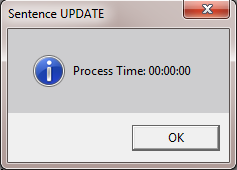
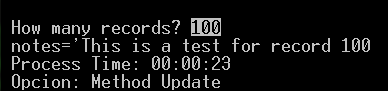
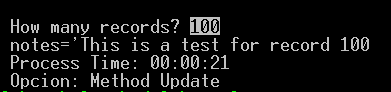
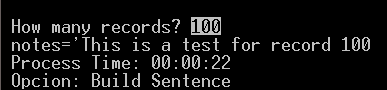
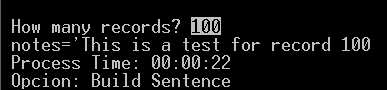
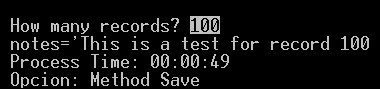
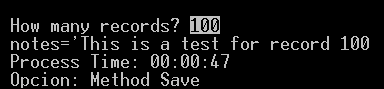
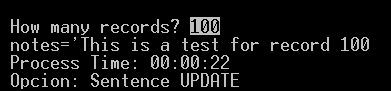
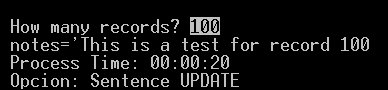
Podemos ver quela diferencia de tiempo no es importante, pero si en la construccion del codigo
we can see, the process time is not important, but yes building source code
Last post i showed various ways to do a Update
- Method Update
- Build Sentence
- Method Save
- Sentence UPDATE
El Method Save fue el mas lento, para actualizacione masivas no es recomendable, porque hace validaciones internas, transforma los valore de clipper a MySql (como sabemos son diferentes los manejos de datas), construye la sentencia Update, verifica valores cambiados del registro actual.
Por tal razon la idea del post anterior fue mostrar las vias de hacer una Actualizacion y demostrar que tecnicas usar dependiendo de las necesidades del modulo a construir
The Save Method was the slowest for bulk update is not recommended, because it makes internal validations, transforms the values of clipper to MySql (as we know are different handlings of datas), builds sentence Update, check the current record changed values.
For this reason the idea of the previous post was to show ways to make an update and demonstrate techniques to use depending on the needs of the module to build
Download Sample
ahora muestro un simple ejemplo de como usar el Method save / Now show a simple test to use Method Save
definimos los Get / define Gets
REDEFINE GET oData:last_name ID 4008 OF oDlg UPDATE WHEN lNew .OR. lMod
REDEFINE GET oData:first_name ID 4009 OF oDlg UPDATE WHEN lNew .OR. lMod
REDEFINE GET oData:suffix ID 4010 OF oDlg UPDATE WHEN lNew .OR. lMod
REDEFINE GET oData:city ID 4011 OF oDlg UPDATE WHEN lNew .OR. lMod
REDEFINE GET oData:state ID 4012 OF oDlg UPDATE WHEN lNew .OR. lMod
REDEFINE GET oData:birth ID 4013 OF oDlg UPDATE WHEN lNew .OR. lMod
REDEFINE GET oData:death ID 4014 OF oDlg UPDATE WHEN lNew .OR. lMod
Cuando cambiemos un valor solo basta hacer un SAVE para guardar dicho valor
When we change a value with a simple SAVE we can save the current value changed
oData:Save()
de otra forma tendriamos que crear la sentencia o hacer uso del Method Update y llenar los valores que requiere ese metodo
otherwise the sentence would have to create or use the Update Method and fill the values that this method requirescQry += "UPDATE president SET "
cQry += "last_name=" + ClipValue2SQL( oData:last_name ) + ","
cQry += "first_name=" + ClipValue2SQL( oData:first_name ) + ","
cQry += "suffix=" + ClipValue2SQL( oData:suffix ) + ","
cQry += "city=" + ClipValue2SQL( oData:city ) + ","
cQry += "state=" + ClipValue2SQL( oData:state ) + ","
cQry += "birth=" + ClipValue2SQL( oData:birth ) + ","
cQry += "death=" + ClipValue2SQL( oData:death ) + " WHERE "
cWhere += "last_name" + ;
If( ( cData := ClipValue2SQL( oData:oQuery:hRow[ '_last_name' ] ) ) == "NULL", " IS ", " = " ) +;
cData + " AND "
cWhere += "first_name" + ;
If( ( cData := ClipValue2SQL( oData:oQuery:hRow[ '_first_name' ] ) ) == "NULL", " IS ", " = " ) +;
cData + " AND "
cWhere += "suffix" + ;
If( ( cData := ClipValue2SQL( oData:oQuery:hRow[ '_suffix' ] ) ) == "NULL", " IS ", " = " ) +;
cData + " AND "
cWhere += "state" + ;
If( ( cData := ClipValue2SQL( oData:oQuery:hRow[ '_state' ] ) ) == "NULL", " IS ", " = " ) +;
cData + " AND "
cWhere += "city" + ;
If( ( cData := ClipValue2SQL( oData:oQuery:hRow[ '_city' ] ) ) == "NULL", " IS ", " = " ) +;
cData + " AND "
cWhere += "birth" + ;
If( ( cData := ClipValue2SQL( oData:oQuery:hRow[ '_birth' ] ) ) == "NULL", " IS ", " = " ) +;
cData + " AND "
cWhere += "death" + ;
If( ( cData := ClipValue2SQL( oData:oQuery:hRow[ '_death' ] ) ) == "NULL", " IS ", " = " ) +;
cData
cQry += cWhere
oData:oServer:SqlQuery( cQry )
oData:LoadQuery()
Podemos ver quela diferencia de tiempo no es importante, pero si en la construccion del codigo
we can see, the process time is not important, but yes building source code
martes, 20 de julio de 2010
Update
Mostrare 4 formas de actualizar una tabla, activando y descactivando los errores internos de dolphin y ver la repercucion en este proceso
I'll show 4 ways to do Update, setting ON/Off dolphin's internal errors
To turn ON/OFF internal error in tdolp.mak change USE_INTERNAL YES/NO
Download with Internal Error ON
Download with Internal Error OFF
1) Method Update
Util para parametrizar la actualizacion, dejando a Dolphin crear la sentencia / Useful to custom Update and let Dolphin build sentence
aColumns = { "Married", "Age", "salary", "Notes" }
aValues = { .f., 40, 10, oQry:Notes }
cWhere = "notes='" + oQry:Notes + "'"
oServer:Update( "clientes", aColumns, aValues, cWhere )
Internal Error ON
Internal Error OFF
2) Build Sentence
3) Method Save
Util para guardar la edicion de un registro especifico / Useful to save record in edition mode
oQry:married = .T.
oQry:age = 30
oQry:salary = 20
oQry:Save()
Internal Error ON
Internal Error OFF
4) Sentence UPDATE
Crear la sentencia Update / Build Update sentence
I'll show 4 ways to do Update, setting ON/Off dolphin's internal errors
To turn ON/OFF internal error in tdolp.mak change USE_INTERNAL YES/NO
Download with Internal Error ON
Download with Internal Error OFF
1) Method Update
Util para parametrizar la actualizacion, dejando a Dolphin crear la sentencia / Useful to custom Update and let Dolphin build sentence
aColumns = { "Married", "Age", "salary", "Notes" }
aValues = { .f., 40, 10, oQry:Notes }
cWhere = "notes='" + oQry:Notes + "'"
oServer:Update( "clientes", aColumns, aValues, cWhere )
Internal Error ON
Internal Error OFF
2) Build Sentence
Util para parametrizar la actualizacion, constuyendo la sentencia / Useful to custom Update build sentence your self
cQry = "UPDATE clientes SET "
FOR EACH cField IN aColumns
#ifdef __XHARBOUR__
n = HB_EnumIndex()
#else
n = cField:__EnumIndex()
#endif
cValue = ClipValue2SQL( aValues[ n ] )
cQry += cField + " = " + cValue + ","
NEXT
//Delete last comma
cQry = SubStr( cQry, 1, Len( cQry ) - 1 )
cQry += " WHERE " + cWhere
oServer:SqlQuery( cQry )
EXIT
Internal Error ON
Internal Error OFF
3) Method Save
Util para guardar la edicion de un registro especifico / Useful to save record in edition mode
oQry:married = .T.
oQry:age = 30
oQry:salary = 20
oQry:Save()
Internal Error ON
Internal Error OFF
4) Sentence UPDATE
Crear la sentencia Update / Build Update sentence
cQry = "update clientes set "
cQry += "married = 0,"
cQry += "age = 40,"
cQry += "salary = 10"
cQry += " where " + cWhere
oServer:SqlQuery( cQry )
Internal Error ON
Internal Error OFF
sábado, 17 de julio de 2010
Usar Variables en el servidor/To use variable on Server
Podemos hacer uso de variables en el servidor para mejorar nuestras consultas y permitir que el mismo servidor de MySql ejecuta las operaciones por nosotros
We can use variables on Mysql server to enhanced our queries and let the server work by us
primero debemos declararlas antes de usarlas
despues podemos hacer uso de esas variable dentro de nuestras consultas
First, should declare variables before use it
after we can use inside query
ejemplo/sample
oServer:Execute( "set @balance:=0, @val1:=20, @val2:=100" )
oQry = oServer:Query( "select credit, debit, @balance:=@balance+credit-debit as balance, @val1, @VAL2 from test" )
Download Test
podemos ver come el query retorna en una de sus columnas el saldo acumulado de cada fila
we can see, the query return a total balance by row
We can use variables on Mysql server to enhanced our queries and let the server work by us
primero debemos declararlas antes de usarlas
despues podemos hacer uso de esas variable dentro de nuestras consultas
First, should declare variables before use it
after we can use inside query
SET @VariableName:=Value, @VariableName:=Value,...
ejemplo/sample
oServer:Execute( "set @balance:=0, @val1:=20, @val2:=100" )
oQry = oServer:Query( "select credit, debit, @balance:=@balance+credit-debit as balance, @val1, @VAL2 from test" )
Download Test
podemos ver come el query retorna en una de sus columnas el saldo acumulado de cada fila
we can see, the query return a total balance by row
viernes, 16 de julio de 2010
ADO Vs Dolphin
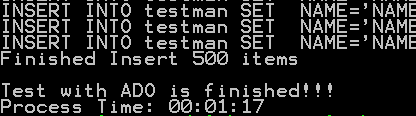
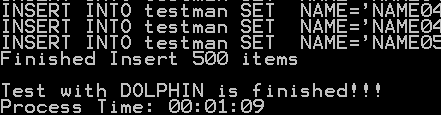
La prueba es una serie 500 INSERT a una tabla remota, los resultados son muy similares
The test is a 500 INSERT series to a remote table, the result was similar
FOR n = 1 TO 500
ADO
Download TestAdo
Test1
Test2
Test3
Test4
DOLPHIN
Download TestDolphin
Test1
Test2
Test3
Test4
The test is a 500 INSERT series to a remote table, the result was similar
FOR n = 1 TO 500
cQry = "INSERT INTO testman SET " + ;
" NAME='NAME" + StrZero( n, 4 ) + "'" +;
",LAST='LAST" + StrZero( n, 4 ) + "'" +;
",BIRTH='" + StrZero( Year( Date() ), 4 ) + "-" + StrZero( Month( Date() ), 2 ) + "-" + StrZero( Day( Date() ), 2 ) +"'" +;
",ACTIVE=1"
? cQry
oServer:Execute( cQry )
NEXT
ADO
Download TestAdo
Test1
Test2
Test3
Test4
Download TestDolphin
Test1
Test2
Test3
Test4
Mi punto de vista es, la gran diferencia en el manejo de ambos, la idea de dolphin es ser mas "amigable" al usuario
My personal view is, the big difference is handle, my Dolphin idea is be more "friendly" to user
miércoles, 14 de julio de 2010
xBrowse
Les incluyo un ejemplo sencillo de como configurar el xBrowse de fivewin, podran decsargarlo del SVN testfw2.prg, el ejemplo incluye, configuracion de xbrowse, ordenamiento de columnas y busqueda incremental por la columna ordenada
It's a simple test to build fivewin xbrowse, the sample include: xbrowse setup, columns sort, incremental seek by order column.
Configuracion / setup
@ 0, 0 XBROWSE oBrw
SetDolphin( oBrw, oQry )
oBrw:CreateFromCode()
.....
PROCEDURE SetDolphin( oBrw, oQry, lAddCols )
LOCAL xField := NIL
LOCAL cHeader := ""
LOCAL cCol := ""
LOCAL aFldNames, oCol
DEFAULT lAddCols := .T.
WITH OBJECT oBrw
:bGoTop := {|| If( oQry:LastRec() > 0, oQry:GoTop(), NIL ) }
:bGoBottom := {|| If( oQry:LastRec() > 0, oQry:GoBottom(), nil ) }
:bSkip := {| n | oQry:Skip( n ) }
:bBof := {|| oQry:Bof() }
:bEof := {|| oQry:Eof() }
:bBookMark := {| n | If( n == nil,;
If( oQry:LastRec() > 0, oQry:RecNo(), 0 ), ;
If( oQry:LastRec() > 0, oQry:goto( n ), 0 ) ) }
:bKeyNo := {| n | If( n == nil, ;
If( oQry:LastRec() > 0, oQry:RecNo(), 0 ), ;
If( oQry:LastRec() > 0, oQry:Goto( n ), 0 ) ) }
:bKeyCount := {|| oQry:LastRec() }
END
oBrw:nDataType := DATATYPE_USER
oQry:Cargo = oQry:aStructure[ 1 ][ MYSQL_FS_NAME ]
IF lAddCols
aFldNames := oQry:aStructure
FOR EACH xField IN aFldNames
cCol := xField[ MYSQL_FS_NAME ]
cHeader := xField[ MYSQL_FS_NAME ]
oCol = SetColFromMySQL( cCol, cHeader, oQry, oBrw )
//set order
oCol:bLClickHeader = Build_CodeBlock_Order( oQry )
NEXT
oBrw:bSeek := { | c | DolphinSeek( c, oQry ) }
ENDIF
RETURN
Orden / Order
//--------------------------------------//
FUNCTION Build_CodeBlock_Order( oQry )
RETURN {| nMRow, nMCol, nFlags, oCol | SetOrderDolphin( oCol, oQry ) }
....
PROCEDURE SetOrderDolphin( oCol, oQry )
LOCAL aToken
LOCAL cType, cOrder
aToken := HB_ATokens( oQry:cOrder, " " )
IF Len( aToken ) == 1
AAdd( aToken, "ASC" )
ENDIF
cOrder = AllTrim( Lower( aToken[ 1 ] ) )
cType = aToken[ 2 ]
AEval( oCol:oBrw:aCols, {| o | o:cOrder := " " } )
IF oQry:aStructure[ oCol:nCreationOrder ][ MYSQL_FS_NAME ] == cOrder
IF Upper( cType ) == "ASC"
cType = "DESC"
oCol:cOrder = "D"
ELSE
cType = "ASC"
oCol:cOrder = "A"
ENDIF
ELSE
cOrder = oQry:aStructure[ oCol:nCreationOrder ][ MYSQL_FS_NAME ]
cType = "ASC"
oCol:cOrder = "A"
ENDIF
oQry:SetOrder( cOrder + " " + cType )
oCol:oBrw:Refresh()
RETURN
Busqueda Incremental / Incremental seek
FUNCTION DolphinSeek( c, oQry )
LOCAL nStart
LOCAL uData, nNum
LOCAL aToken
STATIC aLastRec := {}
aToken := HB_ATokens( oQry:cOrder, " " )
IF Len( aLastRec ) < Len( c )
IF Len( aLastRec ) == 0
nStart = 1
ELSE
nStart = oQry:RecNo()
ENDIF
AAdd( aLastRec, nStart )
ELSE
ADel( aLastRec, Len( aLastRec ) )
ASize( aLastRec, Len( aLastRec ) - 1 )
IF Len( aLastRec ) == 0
nStart = 1
ELSE
nStart = ATail( aLastRec )
ENDIF
ENDIF
oQry:Seek( c, aToken[ 1 ], nStart, oQry:LastRec(), .T., .T. )
RETURN .T.
It's a simple test to build fivewin xbrowse, the sample include: xbrowse setup, columns sort, incremental seek by order column.
Configuracion / setup
@ 0, 0 XBROWSE oBrw
SetDolphin( oBrw, oQry )
oBrw:CreateFromCode()
.....
PROCEDURE SetDolphin( oBrw, oQry, lAddCols )
LOCAL xField := NIL
LOCAL cHeader := ""
LOCAL cCol := ""
LOCAL aFldNames, oCol
DEFAULT lAddCols := .T.
WITH OBJECT oBrw
:bGoTop := {|| If( oQry:LastRec() > 0, oQry:GoTop(), NIL ) }
:bGoBottom := {|| If( oQry:LastRec() > 0, oQry:GoBottom(), nil ) }
:bSkip := {| n | oQry:Skip( n ) }
:bBof := {|| oQry:Bof() }
:bEof := {|| oQry:Eof() }
:bBookMark := {| n | If( n == nil,;
If( oQry:LastRec() > 0, oQry:RecNo(), 0 ), ;
If( oQry:LastRec() > 0, oQry:goto( n ), 0 ) ) }
:bKeyNo := {| n | If( n == nil, ;
If( oQry:LastRec() > 0, oQry:RecNo(), 0 ), ;
If( oQry:LastRec() > 0, oQry:Goto( n ), 0 ) ) }
:bKeyCount := {|| oQry:LastRec() }
END
oBrw:nDataType := DATATYPE_USER
oQry:Cargo = oQry:aStructure[ 1 ][ MYSQL_FS_NAME ]
IF lAddCols
aFldNames := oQry:aStructure
FOR EACH xField IN aFldNames
cCol := xField[ MYSQL_FS_NAME ]
cHeader := xField[ MYSQL_FS_NAME ]
oCol = SetColFromMySQL( cCol, cHeader, oQry, oBrw )
//set order
oCol:bLClickHeader = Build_CodeBlock_Order( oQry )
NEXT
oBrw:bSeek := { | c | DolphinSeek( c, oQry ) }
ENDIF
RETURN
Orden / Order
//--------------------------------------//
FUNCTION Build_CodeBlock_Order( oQry )
RETURN {| nMRow, nMCol, nFlags, oCol | SetOrderDolphin( oCol, oQry ) }
....
PROCEDURE SetOrderDolphin( oCol, oQry )
LOCAL aToken
LOCAL cType, cOrder
aToken := HB_ATokens( oQry:cOrder, " " )
IF Len( aToken ) == 1
AAdd( aToken, "ASC" )
ENDIF
cOrder = AllTrim( Lower( aToken[ 1 ] ) )
cType = aToken[ 2 ]
AEval( oCol:oBrw:aCols, {| o | o:cOrder := " " } )
IF oQry:aStructure[ oCol:nCreationOrder ][ MYSQL_FS_NAME ] == cOrder
IF Upper( cType ) == "ASC"
cType = "DESC"
oCol:cOrder = "D"
ELSE
cType = "ASC"
oCol:cOrder = "A"
ENDIF
ELSE
cOrder = oQry:aStructure[ oCol:nCreationOrder ][ MYSQL_FS_NAME ]
cType = "ASC"
oCol:cOrder = "A"
ENDIF
oQry:SetOrder( cOrder + " " + cType )
oCol:oBrw:Refresh()
RETURN
Busqueda Incremental / Incremental seek
FUNCTION DolphinSeek( c, oQry )
LOCAL nStart
LOCAL uData, nNum
LOCAL aToken
STATIC aLastRec := {}
aToken := HB_ATokens( oQry:cOrder, " " )
IF Len( aLastRec ) < Len( c )
IF Len( aLastRec ) == 0
nStart = 1
ELSE
nStart = oQry:RecNo()
ENDIF
AAdd( aLastRec, nStart )
ELSE
ADel( aLastRec, Len( aLastRec ) )
ASize( aLastRec, Len( aLastRec ) - 1 )
IF Len( aLastRec ) == 0
nStart = 1
ELSE
nStart = ATail( aLastRec )
ENDIF
ENDIF
oQry:Seek( c, aToken[ 1 ], nStart, oQry:LastRec(), .T., .T. )
RETURN .T.
viernes, 9 de julio de 2010
Modificar valor de sentencias / Modify sentences values
Para query "simples" Dolphin separa individualmente el valos de las sentencias y poder asignarlas de manera individual (WHERE, GROUP, HAVING, LIMIT, ORDER)
Puede dejar que dolphin construya las sentencias "simples" por ud
For "simple" query, Dolphin individually separated intervals of sentences and to assign them individually (WHERE, GROUP, HAVING, LIMIT, ORDER)
You can let dolphin build "simple" sentences for you
oQry = TDolphinQry():New( "select student.student_id, student.name, "+;
"absence.date from absence right join student on "+;
"student.student_id = absence.student_id "+;
"where absence.date is not null group by student.student_id"+;
" order by absence.date limit 10", oServer )
? "QUERY => " , oQry:cQuery
?
? "WHERE => " , oQry:cWhere
? "GROUP => " , oQry:cGroup
? "HAVING => ", oQry:cHaving
? "ORDER => ", oQry:cOrder
? "LIMIT => ", oQry:cLimit
? "Changing sentences values"
?
oQry:SetLimit( 3, .F. ) //no refresh
oQry:SetWhere( "absence.date is null" )// by default the query is refresh
? "Limit changed"
? "Where changed"
? "LIMIT => ", oQry:cLimit
? "WHERE => " , oQry:cWhere
?
? "QUERY => " , oQry:cQuery
?
Puede dejar que dolphin construya las sentencias "simples" por ud
For "simple" query, Dolphin individually separated intervals of sentences and to assign them individually (WHERE, GROUP, HAVING, LIMIT, ORDER)
You can let dolphin build "simple" sentences for you
oQry = TDolphinQry():New( "select student.student_id, student.name, "+;
"absence.date from absence right join student on "+;
"student.student_id = absence.student_id "+;
"where absence.date is not null group by student.student_id"+;
" order by absence.date limit 10", oServer )
? "QUERY => " , oQry:cQuery
?
? "WHERE => " , oQry:cWhere
? "GROUP => " , oQry:cGroup
? "HAVING => ", oQry:cHaving
? "ORDER => ", oQry:cOrder
? "LIMIT => ", oQry:cLimit
? "Changing sentences values"
?
oQry:SetLimit( 3, .F. ) //no refresh
oQry:SetWhere( "absence.date is null" )// by default the query is refresh
? "Limit changed"
? "Where changed"
? "LIMIT => ", oQry:cLimit
? "WHERE => " , oQry:cWhere
?
? "QUERY => " , oQry:cQuery
?
lunes, 5 de julio de 2010
Incluir a la Tabla / Insert table
Para añadir registrios a nuestras tablas usamos la sentecia INSERT INTO
To add rows inside tables we use INSERT INTO
En Dolphin se puede usar un string con la sentecia INSERT o usar el METHOD Insert de la clase TDolphinSrv
cQuery = "INSERT INTO student VALUES ('Megan','F',NULL),('Joseph','M',NULL),"+;
"('Kyle','M',NULL),('Katie','F',NULL),('Abby','F',NULL),('Nathan','M',NULL),"+;
"('Liesl','F',NULL),('Ian','M',NULL),('Colin','M',NULL),('Peter','M',NULL),"+;
"('Michael','M',NULL),('Thomas','M',NULL),('Devri','F',NULL),('Ben','M',NULL),"+;
"('Aubrey','F',NULL),('Rebecca','F',NULL),('Will','M',NULL),('Max','M',NULL),"+;
"('Rianne','F',NULL),('Avery','F',NULL),('Lauren','F',NULL),('Becca','F',NULL),"+;
"('Gregory','M',NULL),('Sarah','F',NULL),('Robbie','M',NULL),('Keaton','M',NULL),"+;
"('Carter','M',NULL),('Teddy','M',NULL),('Gabrielle','F',NULL),('Grace','F',NULL),"+;
"('Emily','F',NULL)"
oServer:Execute( cQuery )
Se puede leer la informacion de un archivo usando la funcion D_ReadFile( filename )
we can read query from file using function D_ReadFile( filename )
cQuery = D_ReadFile( "insert_member.txt" )
oServer:Execute( cQuery )
METHOD Insert( cTable, aColumns, aValues )
cTable Table name
aColumns Array with field names
aValues Array with values, should contain same total item like aColumns array
No preocuparse pro el formato de la data, Dolphin la convierte automaticamente en formato valido de Mysql
we dont worried about value format, Dolphin convert automatically all data to MySql format
cTable = "grade_event"
aColumns = { "date", "category", "event_id" } // 3 items
aValues = { CToD( '09-03-2008' ), 'Q', NIL } // 3 values
oServer:Insert( cTable, aColumns, aValues )
To add rows inside tables we use INSERT INTO
En Dolphin se puede usar un string con la sentecia INSERT o usar el METHOD Insert de la clase TDolphinSrv
cQuery = "INSERT INTO student VALUES ('Megan','F',NULL),('Joseph','M',NULL),"+;
"('Kyle','M',NULL),('Katie','F',NULL),('Abby','F',NULL),('Nathan','M',NULL),"+;
"('Liesl','F',NULL),('Ian','M',NULL),('Colin','M',NULL),('Peter','M',NULL),"+;
"('Michael','M',NULL),('Thomas','M',NULL),('Devri','F',NULL),('Ben','M',NULL),"+;
"('Aubrey','F',NULL),('Rebecca','F',NULL),('Will','M',NULL),('Max','M',NULL),"+;
"('Rianne','F',NULL),('Avery','F',NULL),('Lauren','F',NULL),('Becca','F',NULL),"+;
"('Gregory','M',NULL),('Sarah','F',NULL),('Robbie','M',NULL),('Keaton','M',NULL),"+;
"('Carter','M',NULL),('Teddy','M',NULL),('Gabrielle','F',NULL),('Grace','F',NULL),"+;
"('Emily','F',NULL)"
oServer:Execute( cQuery )
Se puede leer la informacion de un archivo usando la funcion D_ReadFile( filename )
we can read query from file using function D_ReadFile( filename )
cQuery = D_ReadFile( "insert_member.txt" )
oServer:Execute( cQuery )
METHOD Insert( cTable, aColumns, aValues )
cTable Table name
aColumns Array with field names
aValues Array with values, should contain same total item like aColumns array
No preocuparse pro el formato de la data, Dolphin la convierte automaticamente en formato valido de Mysql
we dont worried about value format, Dolphin convert automatically all data to MySql format
cTable = "grade_event"
aColumns = { "date", "category", "event_id" } // 3 items
aValues = { CToD( '09-03-2008' ), 'Q', NIL } // 3 values
oServer:Insert( cTable, aColumns, aValues )
Suscribirse a:
Entradas (Atom)